Inventory
The inventory defines the hosts on which commands or scripts are executed. Its primary role is to organise and manage the hosts you want to automate or configure.
Inventory can be created and managed using both the Reemote Python API and the Reemote REST API.
Reemote Python API
The Reemote Python API presents a single operation called Inventory to create inventory.
Declaring an inventory class
This script demonstrate the execution of a shell command on a host and the collection of the results. The script executes the shell command echo Hello World! on all of the hosts in the inventory and prints the response Hello World!. The shell command is executed from user on host server104. The username user and password passsword are used to connect to the server via SSH.
# examples/declaring_an_inventory_class.py
import asyncio
from reemote.execute import execute
from reemote.host import Shell
from reemote.inventory import Inventory, InventoryItem, Connection


async def main():
    inventory = Inventory(
        hosts=[
            InventoryItem(
                connection=Connection(
                    host="server104", username="user", password="password"
                ),
            )
        ]
    )

    responses = await execute(
        lambda: Shell(cmd="echo Hello World!"),
        inventory=inventory,
    )
    for response in responses:
        print(response["value"]["stdout"])


if __name__ == "__main__":
    asyncio.run(main())
This program prints Hello World! on the console.
This inventory consists of a list of InventoryItem objects, one for each host. The inventory object contains a Connection object that describes the ssh connection over which commands are sent.
The InventoryItem and Connection constructors create dictionaries.
Declaring an inventory dictionary
Inventory also can be constructed by declaring dictionaries. The inventory created in the example below is identical to the one created in the example above.
    # examples/declaring_an_inventory_dictionary.py
    inventory = Inventory(
        hosts=[
            {
                "connection": {
                    "host": "server104",
                    "username": "user",
                    "password": "password",
                },
            }
        ]
    )
This inventory consists of a list of dictionaries, one for each host. The dictionary item contains a contains connection key. The value of this item is a dictionary that describes the ssh connection over which commands are sent.
Reading inventory from external sources
The inventory dictionary can be serialised to json. This makes it easy to create applications that read inventory from file.
Inventory data structure
Connection inventory element
Reemote makes use of the Asyncssh library to manage ssh connections. The Connection options are passed to acyncssh.connect. The connection options are documented here: asyncssh.SSHClientConnectionOptions.
Session inventory element
Reemote makes use of the Asyncssh library to manage ssh sessions. The Session options are passed to asyncssh.create_session.
Authentication inventory element
The authentication inventory element contains the sudo and su authentication options.
Groups inventory element
The groups inventory element is used to group hosts by function. Operations specify a host group to act on. By default every host is a member of the group all.
Inventory element example
In the example below, the inventory describes two hosts server104 and server104. The Connection inventory element describes the ssh connection options. Both hosts have the ssh username user and ssh password password. server104 is in the host group servers and server105 is in the host group databases. The shell command group option specifies group databases. So, the shell command will only be executed on servers in this group. In this case server105 is the only member of the group databases so the command will only be executed on that host. The Session inventory element specifies that the terminal type will be set to xterm for all ssh sessions with this host. The Authentication inventory element specifies the sudo password. The shell command requires sudo, so its sudo option is set to True. When the command is executed the sudo password, from the authentication inventory element, will be used.
# examples/inventory_data_structure.py
import asyncio
from reemote.execute import execute
from reemote.host import Shell
from reemote.core.inventory_model import (
    Inventory,
    InventoryItem,
    Connection,
    Session,
    Authentication,
)


async def main():
    inventory = Inventory(
        hosts=[
            InventoryItem(
                connection=Connection(
                    host="server104", username="user", password="password"
                ),
                groups=["all", "servers"],
            ),
            InventoryItem(
                connection=Connection(
                    host="server105", username="user", password="password"
                ),
                session=Session(term_type="xterm"),
                authentication=Authentication(sudo_password="password"),
                groups=["all", "databases"],
            ),
        ]
    )

    responses = await execute(
        lambda: Shell(cmd="cat /etc/shadow", sudo=True, group="databases"),
        inventory=inventory,
    )
    for response in responses:
        print(response["value"]["stdout"])


if __name__ == "__main__":
    asyncio.run(main())
/etc/shadow file from the host server105 on the console.
Using the inventory in scripts
During script execution the remote host's inventory item can be interrogated.
Accessing the inventory in an operation
The Getcontext method can be used to access the inventory item. The inventory_item field of the returned context contains the inventory item for the remote host.
In the example below, the Getcontext response value is used to obtain the user name being used for the ssh connection to the remote host.
    # examples/accessing_the_inventory_in_an_operation.py
    class Root:
        async def execute(self):
            response = yield Getcontext()
            context = response["value"]
            print(context.inventory_item.connection.username)

    await execute(lambda: Root(), inventory=inventory)
When supplied with the inventory from the declaring an inventory class example, above, this prints user on the console.
Accessing the host name or address
The host name or address to connect to is returned as part of the response from every operation.
For example, this code snippet accesses the host field of the response object.
    # examples/accessing_the_host_name_or_address.py
    class Root:
        async def execute(self):
            response = yield Shell(cmd="echo Hello World!")
            print(response["host"])

    await execute(lambda: Root(), inventory=inventory)
This prints server104 on the console
Accessing the inventory in a callback
The context is passed in the callback parameter.
For example, this code snippet accesses the inventory item in the callback command parameter.
    # examples/accessing_the_inventory_in_a_callback.py
    async def _callback(command: Command):
        return command.inventory_item.connection.username

    class Root:
        async def execute(self):
            response = yield Callback(callback=_callback)
            print(response["value"])

    await execute(lambda: Root(), inventory=inventory)
This prints user on the console.
Reemote REST API
The Reemote REST API presents end points to create an inventory, get the inventory content, and to add hosts to or delete hosts from the inventory.
The create endpoint
The Inventory for the REST API can be created using the reemote/inventory/create end point.
For example, this curl command creates an inventory item to access the host server104. Subsequent accesses to the REST API will use this inventory.
curl -X 'POST' \
  'http://127.0.0.1:8001/reemote/inventory/create/' \
  -H 'accept: application/json' \
  -H 'Content-Type: application/json' \
  -d '{"hosts" : [
            {
                "connection": {
                    "host": "server104",
                    "username": "user",
                    "password": "password"
                }
            }
        ]
}'
The command responds:
{ "error": false, "value": "Inventory created successfully." }
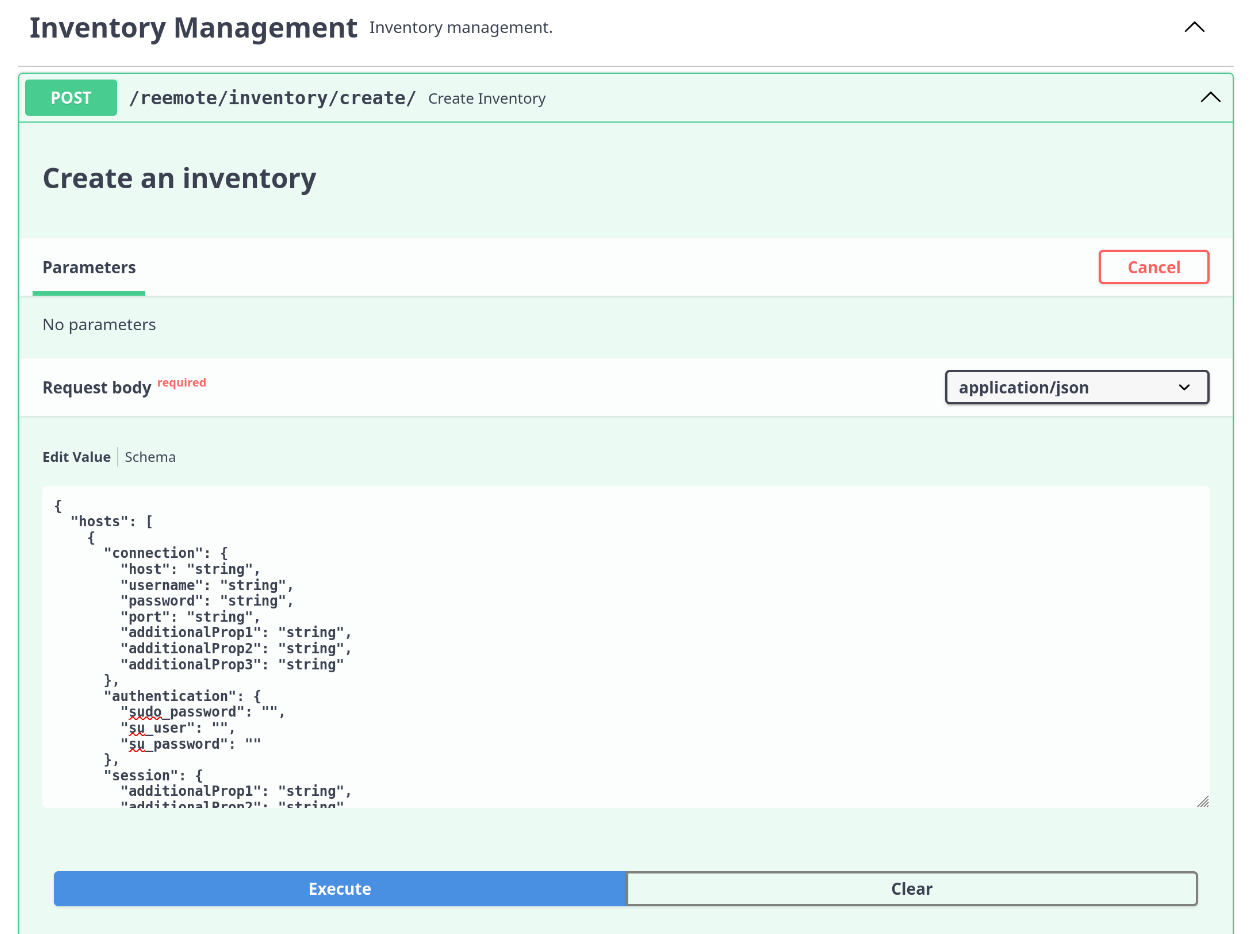
The Swagger UI
The create endpoint can also be accessed using the swagger UI.
For example, navigate to http://127.0.0.1:8001/docs#/Inventory%20Management/create_inventory_reemote_inventory_create__post and enter the json to create the inventory.
Starting the API server with an inventory file
By default, the inventory used by the REST API is stored in the ~/.config/reemote/ directory. It is completely separate from the program defined inventory used during module execution.
The inventory file can be passed as a parameter to the reemote API server.
In this example, the absolute path of a file inventory.json containing the inventory is passed as a parameter when the server is started.
cat <<EOF > inventory.json
{"hosts" : [
            {
                "connection": {
                    "host": "server104",
                    "username": "user",
                    "password": "password"
                }
            }
        ]
}
EOF
reemote --inventory=/home/user/inventory.json
The get endpoint
The Inventory for the REST API can be retrieved using the reemote/inventory/get end point. For example, this curl command returns the inventory in json format.
curl -X 'GET' \ 'http://127.0.0.1:8001/reemote/inventory/get?group=all' \ -H 'accept: application/json'
The command responds:
[ { "error": false, "value": { "hosts": [ { "connection": { "host": "server104", "username": "user", "password": "password" }, "authentication": { "sudo_password": "", "su_user": "", "su_password": "" }, "session": {}, "groups": [] } ] } } ]
The delete endpoint
The inventory item for a host can be deleted from the inventory using the end point reemote/inventory/delete. For example, this curl command removes the inventory item for server104 from the inventory.
curl -X 'DELETE' \ 'http://127.0.0.1:8001/reemote/inventory/delete/server104' \ -H 'accept: application/json'
The command responds:
{ "error": false, "value": "Host deleted successfully: server104" }
The add endpoint
The inventory item for a host can be added to the inventory using the end point reemote/inventory/add. For example, this curl command add the inventory item for server104 to the inventory.
curl -X 'POST' \ 'http://127.0.0.1:8001/reemote/inventory/add/' \ -H 'accept: application/json' \ -H 'Content-Type: application/json' \ -d ' { "connection": { "host": "server104", "username": "user", "password": "password" } }'
The command responds
{ "error": false, "value": "Host added successfully: server104" }